
Published on Athmaus:
Original video:
Topics: Gaming & Tech
Tags: accessories, compatibility, docks, Historical Import, Nintendo Switch, Nintendo Switch 2
When a new Nintendo console arrives, I immediately want to know what I can reuse from the old setup. Do I need to swap every accessory? Will the original dock fit? And what happens when I try a third-party option?
Rather than rely on assumptions, I recorded a series of hands-on checks with the original Nintendo Switch and the Switch 2. This page brings those videos together so you can see the exact setup in each test.
First, fit is not the same as compatibility
A console fitting into a dock is only one part of the question. Charging, displaying a picture on a TV, and working with specific accessories are separate checks. I have kept the original demonstrations organized by test rather than treating every result as a universal yes or no.
My dock and power results
| Setup tested | Fit or connection | TV result in my clip | Charging evidence |
|---|---|---|---|
| Original Switch in Switch 2 dock | Positioned in dock; no successful TV connection shown | No signal detected | Not established |
| Switch 2 in original dock | Does not seat like original Switch | Not demonstrated | Not established |
| Switch 2 setup with original power supply | Power arrangement changed | Correct-AC-adapter warning; no TV connection | 100% shown, rate not tested |
| Original Switch, Joy-Cons removed, in Switch 2 dock | Console body tried without controllers | No working picture shown | Not established |
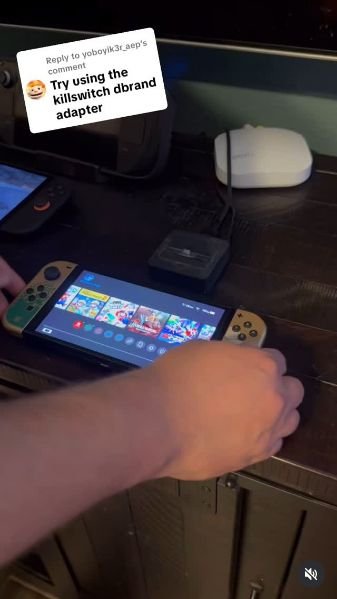
| Original Switch in my third-party travel dock | Connected to travel dock | Switch menu displayed | Not measured |
| Switch 2 in that same travel dock | Connected to travel dock | No Signal; console screen remains on | Not established |
These are the outcomes visible in my June 2025 recordings. I did not measure voltage, current, charging speed, or long-term electrical behavior. A physical fit or a lit screen is not proof of safe compatibility.
Original Switch in the Switch 2 dock
I start with a working TV picture, remove the Switch 2, and try the original Switch in the newer dock. The TV changes to ‘No signal detected’ and does not return to a game picture during this attempt. That is a failed TV-output result in the setup I showed, not proof about charging or electrical safety.
Original video date: June 5, 2025
Does the Switch 2 fit in an original Switch dock?
I compare the consoles at the original dock rather than forcing the larger Switch 2 into it. The Switch 2 does not seat like the original Switch in this demonstration. This is a physical-fit check; it does not establish an electrical connection, charging, or TV output through that dock.
Original video date: June 5, 2025
Original Switch power cable with Switch 2
With the original Switch power supply tried in the Switch 2 setup, the console displays: ‘Couldn’t connect to the TV. Make sure you’re using the correct AC adapter.’ The battery indicator is already at 100%, so that screen does not demonstrate a charging rate or prove successful charging. The result I can report is that TV connection failed with that power arrangement.
Original video date: June 6, 2025
Original Switch in the Switch 2 dock with Joy-Cons removed
I remove the original Switch’s Joy-Cons and try the console body in the Switch 2 dock. Removing the controllers does not produce a working TV picture in the clip. It is useful to separate that from the earlier fit question: extra room around the console is not the same as confirmed video output or charging.
Original video date: June 6, 2025
Third-party dock with Switch and Switch 2
I first connect my original Switch to the small third-party travel dock, and the Switch menu appears on the television. I then try the Switch 2 on that same dock; its own screen stays on and the TV ends on ‘No Signal.’ So this particular dock gives me TV output with the original Switch, but not with Switch 2 in the demonstrated setup. I have not identified its exact model or power rating here, and this is not a verdict on every third-party dock.
Original video date: June 7, 2025
Wii U GameCube adapter test
The adapter-and-controller demonstration goes beyond showing a plug inserted. I navigate from the Switch 2 menu into the Nintendo GameCube application and open The Legend of Zelda: The Wind Waker. The recording reaches the game’s opening and file-selection screens. That supports controller/menu operation in this setup, without establishing every game, multiplayer configuration, or controller feature.
Original video date: June 11, 2025
Super Smash Bros. Ultimate test
I launch Super Smash Bros. Ultimate, move through the menus and character selection, and reach an active match. That is a successful practical check of the adapter/controller setup for the session I recorded. I did not measure input delay, test every mode, or compare multiple adapters.
Original video dates: TikTok: June 12, 2025; Instagram: June 11, 2025
Mario Kart World free-roam gameplay
I open the Mario Kart World map, select a destination, and drive through the world on the TV. The clip shows free-roam travel and steering rather than a timed race or performance benchmark. It is a gameplay example, not evidence that a different dock or power adapter works.
Original video date: June 5, 2025
What I would check before buying another dock
Start with the exact console model and the exact dock or adapter. Check physical fit, charging, TV output, and game or controller support separately. A successful result in one of those areas does not automatically establish the others. For a purchase decision, I would also check Nintendo’s current official compatibility guidance.
Final thoughts
This was a fun way to find out how much of my existing Nintendo setup I could keep using. I have included all eight original clips so you can judge the specific demonstrations for yourself. If you are trying a different dock or adapter, your results may vary.